 Illustration · not an app screenshot
01 / CAPTURE
Give every expense a picture.
Turn a photo into a sticker, or choose one from the collection. Add an amount and category to make your spending easy to revisit.

CapMoney is an expense tracker and monthly budget planner for iPhone.
Record daily spending with photo stickers and see where your money goes.
Made for iPhone · Requires iOS 18.0 or later · Availability varies by region
Take a closer look ↓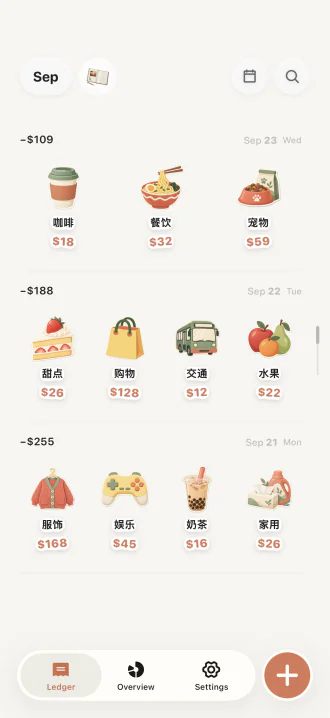
SNAP → STICKER → KEEP
01
See a purchase worth remembering and take a photo. No camera handy? Pick a built-in sticker.
02
Your iPhone cuts the item out of the photo, so the expense gets a face of its own.
03
Add the amount and category, and it lands in today's sticker book. Recording is the point.
 Dining¥32
 Coffee¥18
 Dessert¥26
 Travel¥1,280
 Shopping¥128
 Pets¥59
 Milk tea¥16
 Fruit¥22
 Breakfast¥12.25
 Skincare¥168
 Fun¥45
 Household¥26
Illustrations · sample amounts
THE LITTLE THINGS ADD UP
One purchase at a time, make a little picture of your everyday life.
Illustration · not an app screenshot01 / CAPTURE
Turn a photo into a sticker, or choose one from the collection. Add an amount and category to make your spending easy to revisit.
02 / BUDGET
Set a monthly budget and follow the ring. Overspending appears in red. Tap to see the exact amount.
03 / REFLECT
Browse past months in your sticker book and see spending by category in your report. For foreign-currency expenses, confirm the amount in your ledger currency yourself.
More ways to use CapMoneyCute expense trackerPhoto spending journalOffline expense tracker
YOURS, BY DESIGN
No CapMoney account needed. Online photo recognition is optional. Leave it off and you can still process images locally, enter details, and save expenses.
See how your data is handled ↗
Save 3 entries for free in total. A monthly or annual Pro subscription unlocks continued recording. Pricing is shown in the app's purchase screen.
Download on the App Store ↗